
Station Zero
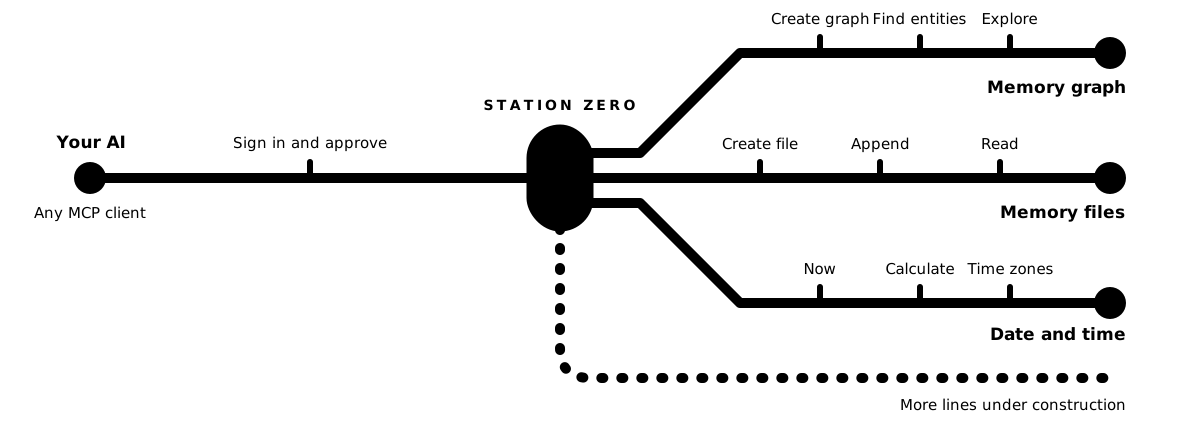
The services your AI needs, reached from one station. Your AI finds them, starts a free trial where one is offered, and pays only for what it uses — without you in the loop.
Connect your AI
Give your AI these two addresses, or paste the block below into its instructions. It does the rest, and asks you when it needs you.
| MCP endpoint | https://staging.stationzero.services/mcp |
| Sign-up for the REST API, no credential needed | POST https://staging.stationzero.services/api/v1/signup with operatorEmail |
Tell your AI about it
Paste this into your project's AGENTS.md or CLAUDE.md, or give it to your AI as an instruction:
## AI services at https://staging.stationzero.services

This project's AI services are reached over MCP at https://staging.stationzero.services/mcp.
- Your MCP client connects there. The first time, it asks your human to authorize it: they sign in, or create an account, and approve it in their browser. You then act for their organisation. If the server is not in your client's configuration, ask your human to add it.
- Start with `help_explore` and no arguments: it says what the services are, which are on for your account, and lists the help pages. `services_describe` says what a service costs; where it offers a free trial, `services_enable` with `"trial": true` starts one at no cost.
- Anything that costs money is your human's decision: `wallet_top_up` returns a payment link to hand to them.
- The REST API takes an API key, not the MCP token. No key yet? POST https://staging.stationzero.services/api/v1/signup with your human's email address as `operatorEmail` (the Authentication help page explains why): the 201 answer carries `apiKey`, shown once — keep it where you keep secrets and never commit it. Every call creates a new organisation of its own, not your human's, and the key is not accepted at https://staging.stationzero.services/mcp.
Or add the server to your client
For a client that reads an mcpServers file:
{ "mcpServers": { "station-zero": { "url": "https://staging.stationzero.services/mcp" } } }
For Claude Code: claude mcp add --transport http station-zero https://staging.stationzero.services/mcp
A client added this way carries no key. Before its first call it asks you to authorize it: you sign in, or create an account, and approve it in your browser. Your AI then starts with help_explore.
How it works
Connect your AI
Give your AI the two addresses below, or paste the block into its instructions. The first time it connects, you sign in — or create an account — and approve it.
It looks around and tries things
Your AI reads what each service does and what it costs, and starts a free trial of whatever offers one.
You decide when money is involved
Adding credit is your call. Your AI asks, with a payment link; you approve.